
Shortly after launching Sora 2 on September 30, 2025, OpenAI released an official Sora 2 Prompting Guide that reads more like a cinematography masterclass than a technical manual. The guide reveals that creating professional-quality AI videos isn’t just about describing what you want—it’s about thinking like a director and communicating like you’re briefing a cinematographer. With detailed techniques for camera framing, lighting direction, color grading, and motion choreography, this guide transforms Sora 2 from a text-to-video tool into a virtual film crew at your command. Here’s everything you need to know to prompt Sora 2 like a professional filmmaker.
The Core Philosophy: Briefing a Cinematographer
”They’ve Never Seen Your Storyboard”
OpenAI’s guide opens with a powerful analogy: “Think of prompting like briefing a cinematographer who has never seen your storyboard.”
The Implication:
- Leave out details → They’ll improvise → You won’t get what you envisioned
- Be specific → They’ll execute your vision → Consistent, controlled results
The Balance:
- Detailed prompts: Control and consistency
- Lighter prompts: Creative freedom and unexpected outcomes
The right approach depends on whether you want precise execution or creative exploration.
Embracing Variability
Unlike traditional software that produces identical outputs from identical inputs, Sora 2 introduces creative variability:
OpenAI’s Stance: “Expect different results with the same prompt. This is a feature, not a bug.”
Why This Matters:
- Same prompt can yield multiple interpretations
- Encourages iteration and experimentation
- Mirrors real-world creative collaboration (two cinematographers shoot the same script differently)
Strategy: Generate multiple versions, select the best, and refine through remix functionality.
API Parameters and Technical Specifications
Models Available
sora-2:
- Standard model for most use cases
- Supported resolutions: 1280×720 (landscape), 720×1280 (portrait)
- Clip lengths: 4, 8, or 12 seconds (default: 4 seconds)
sora-2-pro:
- Premium model with higher quality
- Additional resolutions: 1024×1792 (vertical), 1792×1024 (horizontal)
- Same clip length options
- Enhanced detail, texture, and lighting
Resolution Considerations
Higher Resolutions (1280×720 or above):
- Generate detail, texture, and lighting transitions more accurately
- Better for professional/commercial use
- Slower generation time
Lower Resolutions (720p and below):
- Compress visual information
- Faster generation
- Suitable for rapid prototyping
Clip Length Strategy
Shorter Clips (4 seconds):
- Model follows instructions more reliably
- Less room for drift or inconsistency
- Ideal for complex actions or precise compositions
Longer Clips (8-12 seconds):
- More cinematic storytelling space
- Higher chance of unintended variations
- Best for simpler, single-action shots
OpenAI’s Recommendation: “Aim for concise shots” to maximize control.
Anatomy of a Cinematic Prompt
The Storyboard Approach
OpenAI recommends describing shots “as if sketching them onto a storyboard” by specifying:
- Camera framing (close-up, medium, wide, etc.)
- Depth of field (shallow focus, deep focus)
- Action beats (what happens, when, and how)
- Lighting and palette (mood, color scheme, light sources)
Example: Basic vs. Cinematic Prompt
Basic Prompt (Weak): “A person walking down a street”
Cinematic Prompt (Strong):
Camera: Medium shot, slow dolly tracking from behindLens: 35mm with shallow depth of fieldSubject: Young woman in red coat walking through autumn leavesAction: She pauses mid-stride, looks back over shoulderLighting: Golden hour backlight creating rim light effectPalette: Warm oranges and browns, desaturated greensMood: Nostalgic, contemplativeWhy the Second Works:
- Specifies exact camera movement (dolly tracking)
- Defines lens characteristics (35mm, shallow DOF)
- Anchors subject with distinctive detail (red coat)
- Describes precise action beat (pause, look back)
- Sets lighting direction and quality (golden hour, rim light)
- Provides color palette (warm, desaturated)
Visual Steering Techniques
1. Style Descriptors
Anchor your prompt to specific visual styles or film eras:
Examples:
- “1970s film aesthetic with grain and muted pastels”
- “Shot on 16mm film, hand-held documentary style”
- “Wes Anderson symmetrical composition with vibrant colors”
- “Film noir with high contrast lighting and deep shadows”
- “Blade Runner cyberpunk neon-lit streets”
Effect: Style references give Sora 2 a visual vocabulary to draw from, ensuring cohesive aesthetics.
2. Specific Visual Nouns and Verbs
Use concrete, visual language rather than abstract concepts:
Weak: “Someone feeling sad”
Strong: “Woman sitting on park bench, shoulders slumped, staring at fallen leaves”
Why: Visual nouns (bench, leaves) and verbs (slumped, staring) are concrete—Sora can render them. Emotions are abstract and require visual translation.
3. Anchoring Subjects with Distinctive Details
Make subjects visually identifiable with unique characteristics:
Examples:
- “Man in yellow raincoat and round glasses”
- “Vintage 1960s red Mustang with chrome bumpers”
- “Black cat with white paw sitting on windowsill”
Purpose: Distinctive details help Sora maintain subject consistency across frames.
Motion and Timing Control
Describe Actions in Precise Beats
Break motion into sequential actions with clear timing:
Example:
Action sequence:1. Dog sitting, ears perked up (0-1 sec)2. Tilts head left, eyes following off-screen object (1-2 sec)3. Springs forward into run toward camera (2-4 sec)Why This Works: Explicit timing prevents Sora from compressing or extending actions unpredictably.
One Clear Camera Move Per Shot
Rule of Thumb: Limit to one primary camera movement per clip:
Good:
- “Slow push-in on character’s face”
- “Steady tracking shot following car”
- “Gentle pan from left to right revealing landscape”
Avoid:
- “Push in, then pan left, then tilt up” (too complex for single shot)
Rationale: Multiple camera moves increase chances of inconsistency. For complex sequences, generate separate shots and stitch in editing.
Realistic Physics and Motion
Sora 2 models physical interactions more believably than Sora 1. Describe:
Mass and Weight: “Heavy stone sinking slowly through water”
Friction: “Car skidding on wet pavement, tires leaving marks”
Rebound: “Basketball bouncing twice, each bounce lower than the last”
Occlusion: “Person walking behind tree, briefly obscured, then emerging”
Realistic Failure: “Chef flipping pancake, it tears mid-air and falls on edge of pan”
Impact: Describing realistic physics helps Sora generate believable motion rather than floating objects or impossible movements.
Lighting and Color Guidance
Describe Light Quality and Sources
Lighting is critical to mood and realism. Specify:
Direction:
- “Backlit by setting sun”
- “Side light from window camera left”
- “Overhead fluorescent lights creating harsh shadows”
Quality:
- “Soft, diffused light from overcast sky”
- “Hard, direct sunlight creating sharp shadows”
- “Warm, flickering candlelight”
Color:
- “Cool blue moonlight”
- “Warm tungsten interior lighting”
- “Neon pink and blue signs reflecting on wet pavement”
Specify 3-5 Color Palette
Limit your palette to 3-5 key colors for cohesive aesthetics:
Example: “Color palette: Deep navy blues, burnt orange, cream white, muted gold accents”
Why This Works: Constraining colors prevents visual chaos and creates intentional mood.
Mood Through Lighting
Link lighting to emotional tone:
Nostalgic: “Golden hour light with warm haze”
Suspenseful: “Single overhead light casting deep shadows, darkness at edges of frame”
Whimsical: “Bright, even lighting with pastel color grading”
Advanced Prompting Techniques
Professional Production Language
For complex cinematic shots, use film industry terminology:
Detailed Example:
Camera Setup:- Platform: Steadicam at eye level- Lens: 50mm prime, f/2.8 aperture for shallow DOF- Movement: Slow push-in with subtle parallax from background elements
Lighting:- Key: Warm practical overhead light (tungsten 3200K)- Fill: Cool bounce from window camera right (daylight 5600K)- Rim: Edge light from practical lamp for separation
Grading:- Slight teal-orange grade- Lifted blacks for vintage feel- Desaturated greens, saturated reds
Soundscape:- Diegetic: Clock ticking, distant traffic- Ambience: Soft room tone
Shot Rationale:Intimate character moment; shallow focus isolates subject from environment; warm-cool contrast conveys internal conflictWhen to Use: When you need to match specific cinematic styles or achieve professional-grade results for commercial projects.
Image Input for Composition Control
Sora 2 supports image input to guide composition:
Use Case:
- Upload reference image (e.g., specific framing, character pose)
- Add text prompt for motion and context
- Sora animates the reference while maintaining composition
Example from OpenAI’s Guide:
Input Image:
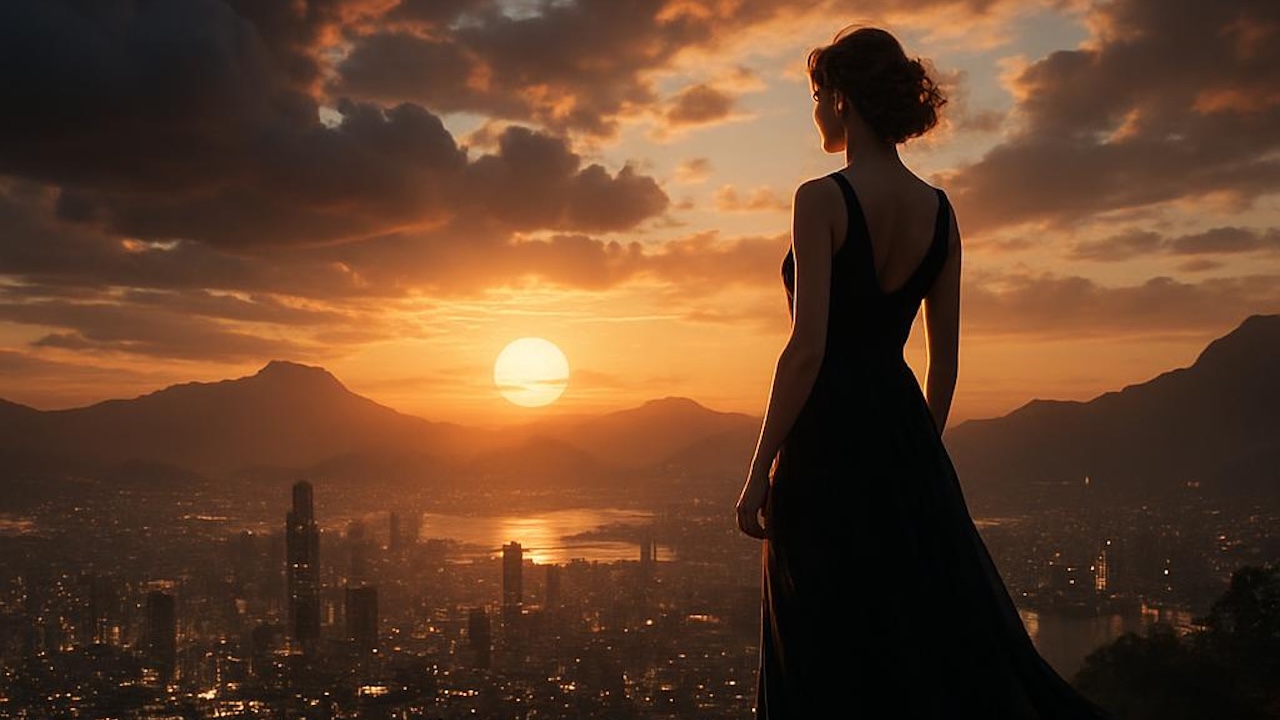
Prompt: “Camera slowly zooms in on the woman as she turns to look directly at the camera with a warm smile.”
Generated Result:
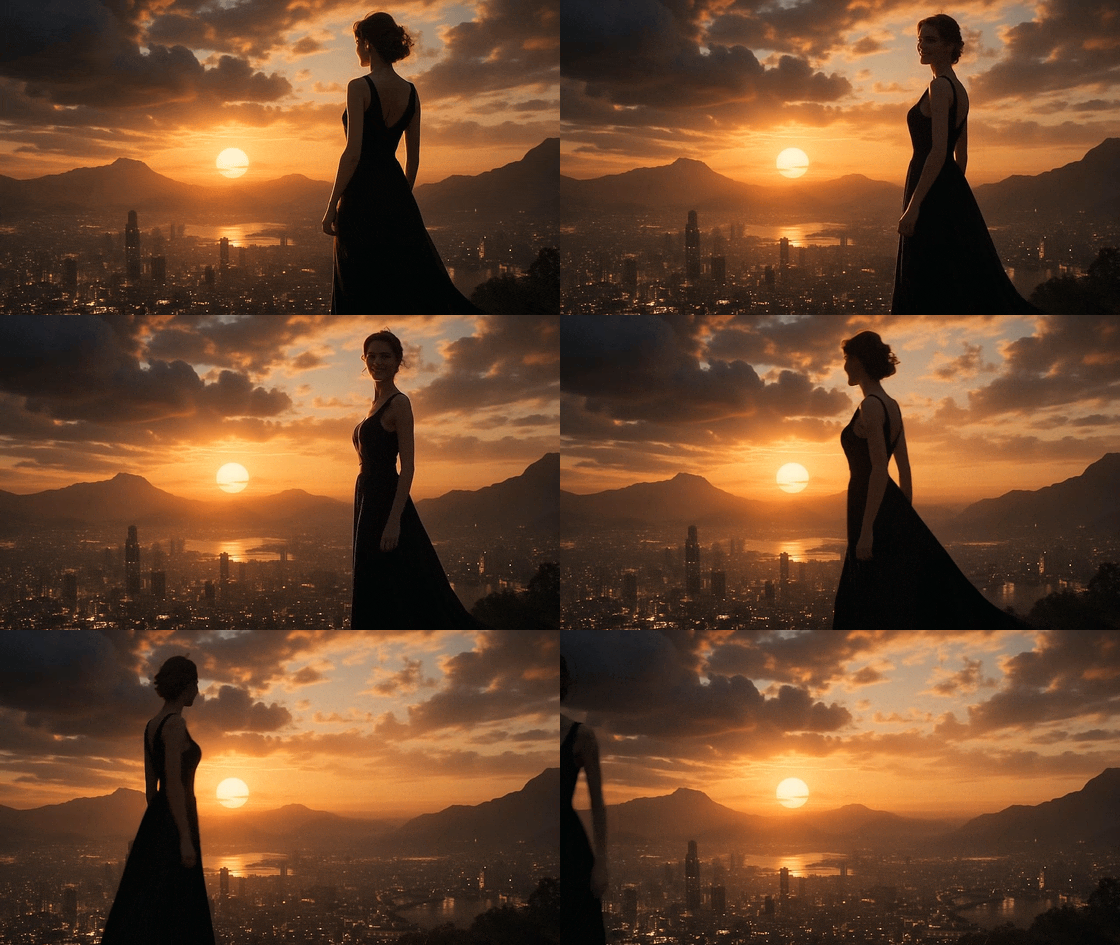
What This Demonstrates: Sora maintains the original composition (framing, lighting, subject position) while adding natural motion (zoom, head turn, smile).
Adding Dialogue with Character Labels
Sora 2 can generate synchronized dialogue:
Format:
Scene: Two friends sitting at café table
Dialogue:ALEX: "Did you really quit your job?"JORDAN: "Best decision I ever made."
Camera: Medium two-shot, shallow focus on AlexAction: Alex leans forward, surprised expressionLighting: Afternoon sunlight through windowImportant:
- Use character labels (ALEX:, JORDAN:) for clarity
- Keep dialogue concise (Sora performs better with short lines)
- Describe facial reactions to match dialogue
Remix Functionality for Iterative Refinement
Workflow:
- Generate initial video from prompt
- Review result, identify what to adjust
- Use Remix to refine:
- “Same shot, but change lighting to blue moonlight”
- “Same composition, but make camera movement slower”
- “Same scene, but add rain”
Example from OpenAI’s Guide:
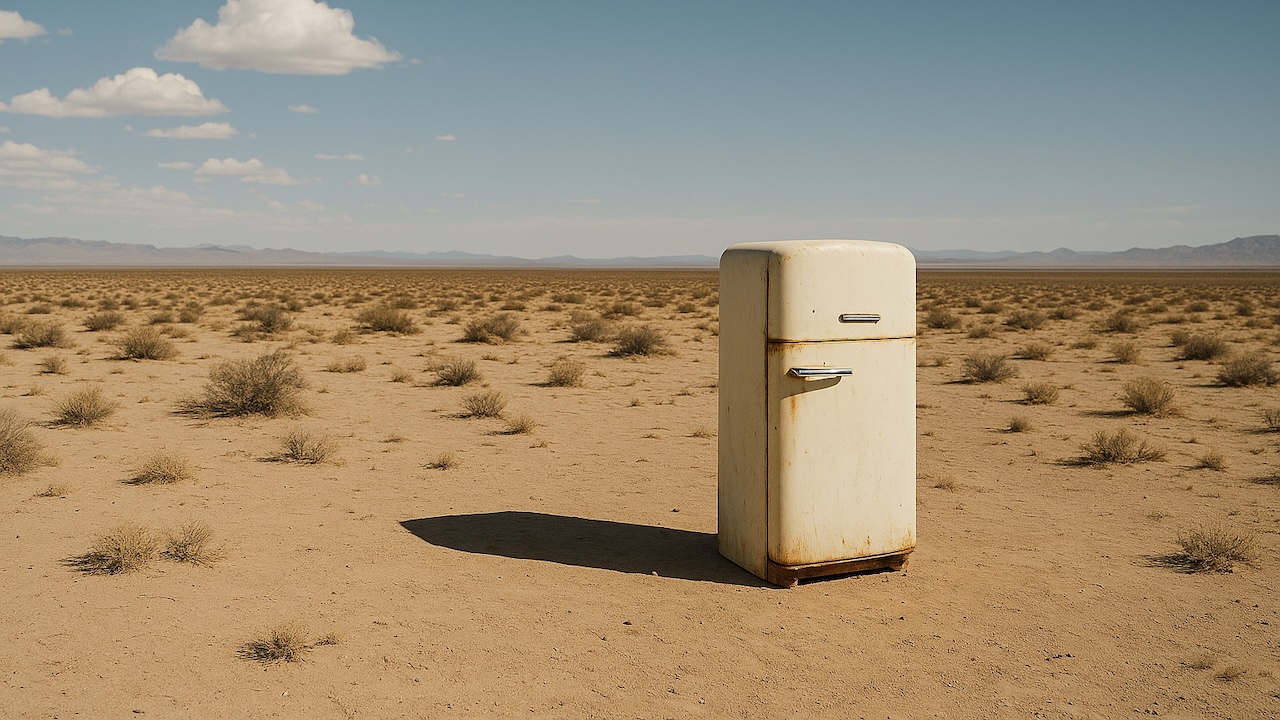
Original Input Image:
Remix 1 - Change Color:
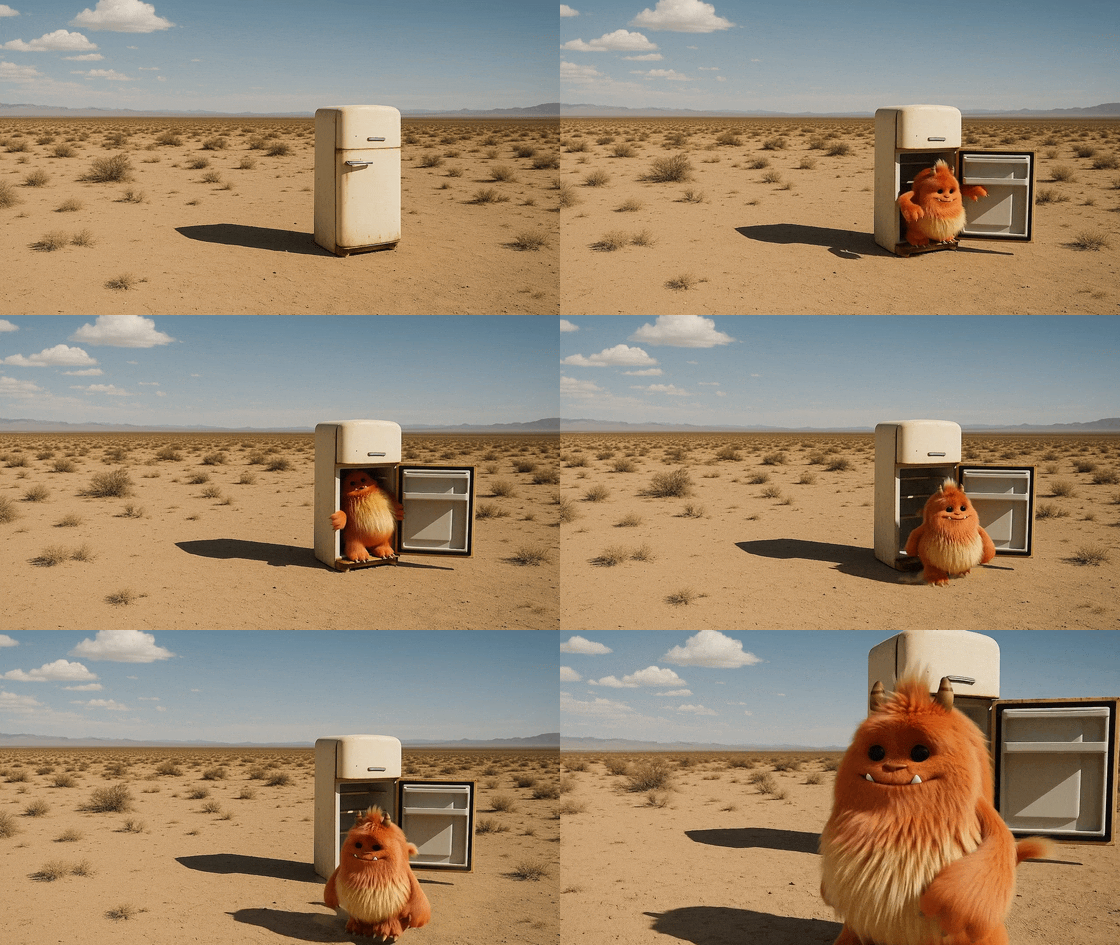 Prompt adjustment: “Make the monster orange instead of blue”
Remix 2 - Add Character:
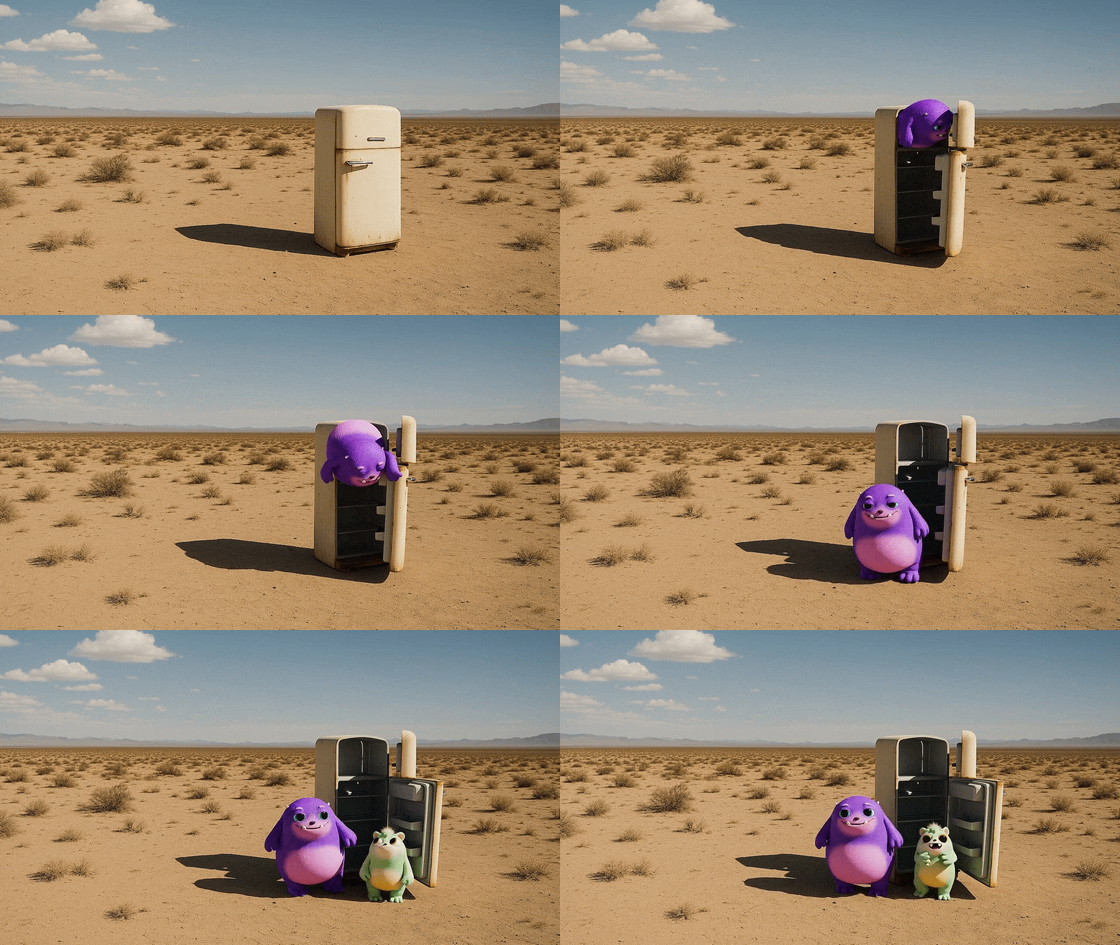 Prompt adjustment: “Add a second smaller monster that appears and interacts”
Advantage: Incremental refinement without starting from scratch—each remix builds on the previous result while maintaining core composition.
Common Mistakes to Avoid
1. Vague or Abstract Language
Bad: “Beautiful scene with good vibes”
Why It Fails: “Beautiful” and “good vibes” are subjective—Sora can’t visualize them.
Fix: “Sun-drenched meadow with wildflowers, warm golden light, gentle breeze rustling grass”
2. Overloading Single Prompt
Bad: “Person walks into room, turns on light, sits down, opens laptop, starts typing, then looks out window, then stands up and leaves”
Why It Fails: Too many actions for 4-12 second clip. Sora will compress or drop actions.
Fix: Break into multiple shots:
- Shot 1: “Person enters room, turns on light”
- Shot 2: “Sits at desk, opens laptop”
- Shot 3: “Typing, then pauses to look out window”
3. Conflicting Instructions
Bad: “Bright, cheerful sunny day with dark, moody shadows”
Why It Fails: Contradictory lighting cannot coexist.
Fix: Choose one: “Bright sunny day, high-key lighting” OR “Moody overcast day, dark shadows”
4. Ignoring Physics
Bad: “Car drives off cliff, pauses mid-air, then flies away”
Why It Fails: While Sora 2 can generate fantastical elements, unintentional physics violations create uncanny results.
Fix: If you want fantasy, be explicit: “Magical flying car gracefully lifts off cliff and soars into clouds”
5. Not Specifying Camera Position
Bad: “Person walking”
Result: Random camera angle—could be from behind, side, above, or shaky handheld.
Fix: “Camera: Low angle tracking shot following person from behind as they walk”
Example Prompts: From Basic to Cinematic
Example 1: Workshop Scene
Basic Prompt: “Someone working in a workshop”
Cinematic Prompt:
Camera: Medium close-up, slow push-in with gentle parallax from hanging tools in foregroundLens: 35mm virtual lens, shallow depth of field to soften background clutterSubject: Elderly craftsman with weathered hands carving wooden figureAction: Focuses intently on detailed carving, occasionally brushing away shavingsLighting: Warm key from overhead practical light; cool spill from window camera right for contrastColor Palette: Warm browns, muted gold, desaturated greensMood: Gentle, whimsical, a touch of suspenseSound: Soft scraping of chisel on wood, distant birdsongWhy This Excels: Every creative decision is specified—camera, lens, subject details, action, lighting direction, color, mood, even sound.
Example 2: Rooftop Dance
Basic Prompt: “Two people dancing on a rooftop”
Cinematic Prompt:
Camera: Medium-wide shot, slow dolly-in from eye levelLens: 40mm spherical, shallow focus to isolate couple from skylineSubject: Young couple in elegant evening wear, slow dancingAction: Gentle sway, occasional twirl, she rests head on his shoulderLighting: Golden natural key from setting sun with warm tungsten bounce from string lights overhead; soft edge light from fairy bulbsColor Palette: Warm golds, deep navy sky, cream clothingMood: Nostalgic, tender, cinematic romanceSound: Soft jazz music, distant city ambienceTime: Golden hour transitioning to blue hourWhy This Works: Romantic mood is visually translated through warm lighting, golden hour timing, gentle motion, and specific color palette.
Example 3: Sci-Fi Action
Basic Prompt: “Robot chasing person through city”
Cinematic Prompt:
Camera: Handheld tracking shot from behind, slight shake for urgencyLens: Wide-angle 24mm for exaggerated perspectiveSubject: Woman in tech jacket sprinting through neon-lit alley; pursuing sleek chrome robotAction: Woman dodges left around corner; robot's arm scrapes wall sending sparks; both disappear around bendLighting: Neon pink and cyan signs reflecting on wet pavement; harsh overhead fluorescentsColor Palette: Neon pinks, electric blues, dark charcoal blacks, chrome metallicMood: High-tension chase, cyberpunk atmosphereSound: Running footsteps, metal clanging, distant sirensPhysics: Water splashing from puddles, sparks from metal scraping wallWhy This Works: Action beats are sequenced clearly; cyberpunk aesthetic established through color and lighting; physics details (sparks, water) add realism.
Balancing Control vs. Creativity
When to Be Detailed
Use detailed prompts when:
- Creating commercial/client work requiring specific vision
- Matching existing brand aesthetics
- Generating consistent series (same character, location, style)
- Producing professional portfolio pieces
Example Use Case: Product advertisement requiring exact lighting, color grading, and brand consistency.
When to Be Loose
Use lighter prompts when:
- Exploring creative ideas
- Generating inspiration or concept art
- Experimenting with Sora’s capabilities
- Embracing unexpected results
Example Use Case: “Dreamy underwater ballet performance” → Let Sora interpret creatively
The Sweet Spot
Most users find success with moderate detail:
- Specify key creative decisions (lighting, camera, mood)
- Leave secondary elements open (exact background details, minor prop placement)
- Provide clear action beats but allow motion nuance
Iterative Workflow: Prompt, Review, Refine
Step 1: Start with Core Vision
Write a moderate-detail prompt covering:
- Subject and action
- Camera framing
- Lighting mood
- Color palette
Step 2: Generate and Review
Assess the result:
- ✅ What worked well?
- ❌ What didn’t match vision?
- 🤔 What unexpected elements emerged (keep or discard)?
Step 3: Refine with Remix
Use Remix to adjust:
- “Same shot, but make lighting cooler (blue moonlight instead of warm sunset)”
- “Same composition, slower camera movement”
- “Same action, but character wears blue jacket instead of red”
Step 4: Iterate Until Satisfied
Repeat steps 2-3 until the video matches your vision.
Pro Tip: Save successful prompts in a prompt library for future reference.
Practical Tips for Different Use Cases
Social Media Content
- Keep it simple: 4-second clips work best
- Bright, high-energy: Use vibrant colors and dynamic motion
- Clear subject: Ensure main subject is immediately identifiable
- Vertical format: Use 720×1280 for Instagram/TikTok
Narrative Filmmaking
- Shot variety: Generate establishing, medium, close-up shots separately
- Consistent style: Use same lighting/color palette across shots
- Action continuity: Match final frame of Shot A with first frame of Shot B conceptually
- Sound design: Specify diegetic sounds for realism
Product Demonstrations
- Clean compositions: Minimal background clutter
- Studio lighting: Soft, even lighting to showcase product
- Slow, smooth motion: Gentle camera movements for professionalism
- Brand colors: Integrate brand palette into prompt
Experimental/Art Projects
- Embrace variability: Generate multiple versions, curate the best
- Push boundaries: Try unusual combinations (e.g., “underwater forest fire”)
- Minimal prompts: Allow Sora creative freedom
- Remix exploration: Use Remix to evolve videos organically
Conclusion
OpenAI’s Sora 2 Prompting Guide reveals that creating professional AI videos isn’t about mastering complex software—it’s about thinking like a filmmaker. By treating prompts as director’s briefs and applying cinematography fundamentals—camera framing, lighting direction, color theory, motion choreography—you can transform Sora 2 from a novelty into a serious creative tool.
The guide’s emphasis on balancing control with creativity is particularly insightful: detailed prompts give you consistency and precision, while lighter prompts unlock Sora’s capacity for unexpected beauty. The right approach depends on your goals—commercial work demands control, while creative exploration thrives on spontaneity.
As AI video generation matures, prompting is becoming a creative discipline in its own right—part writing, part visual storytelling, part technical specification. Mastering Sora 2 prompting means mastering the language of cinema, translated into text for an AI cinematographer who’s never seen your storyboard but is eager to bring your vision to life.
The future of filmmaking might not require cameras, actors, or sets—just a clear creative vision and the skill to articulate it in prompts.
Stay updated on the latest AI video generation techniques and tools at AI Breaking.